Educational case study combining two supplied SIT 218/738 Secure Coding reports. All testing described in Task 10.1P concerns local training applications. Task 10.2C is a literature-based comparison, not a new benchmark run. Requirements and editorial notes are distinct from the original solution text. Pricing, benchmark claims and references in the original comparison are retained as submitted, not independently verified. The original screenshots are not reproduced in this edition; the chart and scan summary are derived from the supplied ZAP export. The raw report includes session data and is not available for public download.
Assessment requirements
Task 10.1P — Pass task: Use ZAP to scan the local web application and document the findings and steps with screenshots (Activity 1, step 12); carry out fuzz testing and document the steps and screenshots (Activity 2, step 15).
Task 10.2C — Credit task: Compare three SAST and three DAST tools, including at least one commercial tool, using language support, cost, IDE integration and true/false positive rates. Explain the OWASP Benchmark dataset and scoring, provide a conclusion and references. The assignment brief specifies a maximum of three pages excluding references.
Task 10.1P — OWASP ZAP vulnerability scanning
Activity 1: Vulnerability scan
Run Application on Server
Right-clicked the project → Run As → Run on Server → selected Apache Tomcat → clicked Finish. App started at:
http://localhost:8080/SQLInjection-secured/
Clicked the browser icon in ZAP to open the ZAP browser. Copied the web app URL from Firefox (http://localhost:8080/SQLInjection-secured/showLogin) and pasted it into the ZAP browser.
Right-Click Web App Node → Active Scan
In the left Sites tree, expanded http://localhost:8080 → right-clicked the SQLInjection-secured node → Attack → Active Scan.
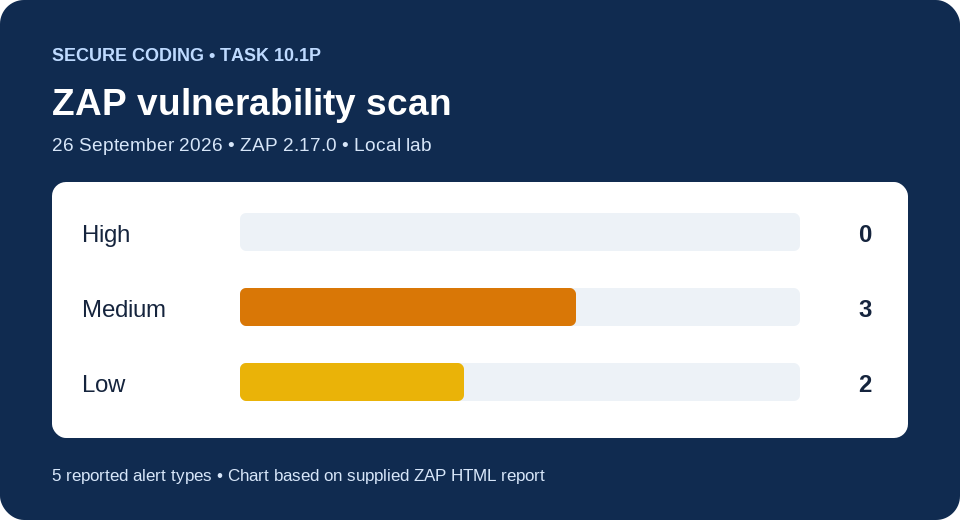
The scan began and progress was visible in the bottom panel. After completion, the Alerts tab showed 5 vulnerabilities discovered.
Clicked Report → Generate Report. In the dialog:
- Title: ZAP by Checkmarx Scanning Report
- Report Name: 2026-09-26-ZAP-Report-.html
- Report Directory: /home/kali/zap_report
- Contexts: Default Context
- Sites: http://localhost:8080
- Checked Display Report → clicked Generate Report
Opened the generated report folder (/home/kali/zap_report) and read the HTML report. The scan found 5 vulnerabilities — no High-risk, 3 Medium-risk, and 2 Low-risk issues.
ZAP report findings
| # | Vulnerability | Risk | Confidence | CWE |
|---|---|---|---|---|
| 1 | Content Security Policy (CSP) Header Not Set | Medium | High | CWE-693 |
| 2 | Missing Anti-clickjacking Header | Medium | Medium | CWE-1021 |
| 3 | Absence of Anti-CSRF Tokens | Medium | Low | CWE-352 |
| 4 | Cookie without SameSite Attribute | Low | Medium | CWE-1275 |
| 5 | X-Content-Type-Options Header Missing | Low | Medium | CWE-693 |
Verification against the original ZAP 2.17.0 export: all five alert types and risk classifications match the supplied solution. The UI screenshot also shows two informational entries, which are not counted in the exported five-alert report. Scanner alerts require validation; zero high-risk alerts does not establish that the application is secure.
Detailed Vulnerability Summary:
1. Content Security Policy (CSP) Header Not Set — Medium / High
The response does not include a Content-Security-Policy header, which is an added layer of security that helps detect and mitigate attacks such as Cross-Site Scripting (XSS) and data injection. Solution: Configure the server to set the CSP header.
2. Missing Anti-clickjacking Header — Medium / Medium
The response does not protect against ClickJacking attacks. It should include either Content-Security-Policy with frame-ancestors directive or X-Frame-Options. Solution: Set X-Frame-Options: DENY or SAMEORIGIN, or implement CSP frame-ancestors.
3. Absence of Anti-CSRF Tokens — Medium / Low
No Anti-CSRF tokens were found in the HTML login form (<form id="command" action="/SQLInjection-secured/authenticateTheUser" method="POST">). CSRF attacks force a victim to send an HTTP request without their knowledge. Solution: Use anti-CSRF packages (e.g., OWASP CSRFGuard), generate unique nonces for each form, and verify them upon receipt.
4. Cookie without SameSite Attribute — Low / Medium
The JSESSIONID cookie is set without the SameSite attribute, meaning it can be sent as a result of a cross-site request. Solution: Set SameSite to lax or ideally strict for all cookies.
5. X-Content-Type-Options Header Missing — Low / Medium
The X-Content-Type-Options header was not set to nosniff, allowing older browsers to perform MIME-sniffing on the response body. Solution: Set X-Content-Type-Options: nosniff for all web pages.
Part 2: Fuzzing (Activity 2)
Expanded src → main → java → edu → deakin → sit218 → coachwebapp. Opened Client.java and commented out validation annotations (lines 12, 13, 14 and others) by commenting // — disabling @NotNull, @Size, @Pattern, @Min, @Max.
App running on Tomcat – browser showing "Hey, null you are still too young, no need to work out!" ]
In ZAP, opened History tab → right-clicked the URL http://localhost:8080/05-coachwebapp-spring/workout/processForm → Attack → Fuzz.
The Fuzzer window opened showing the full HTTP GET request (headers: Host, User-Agent, Accept, Cookie, etc.). I clicked Edit, modified the URL to include ?name=test&age=45, and clicked Save. Then I highlighted the word test in the URL and clicked Add to open the payload dialog.
In the Add Payload dialog, I selected Type: File, then browsed to /home/kali/Desktop/SIT218/wfuzz/chars.txt and selected it. The preview showed characters 0–9 and a–z. I clicked Add, then OK, returning to the Fuzzer window with the payload loaded and test highlighted in the URL.
Clicked Start Fuzzer. ZAP sent requests substituting each character for test in the name parameter. The results table showed all requests returned HTTP 200 (OK) with consistent response sizes (~341 bytes). Task IDs 43–62+ all showed "Reflected" state and "OK" reason.
The activity records acceptance and reflection of the tested characters. HTTP 200 and reflected input are not, by themselves, proof of executable cross-site scripting. Validation was deliberately disabled for the local exercise and should not be disabled in production.
Task 10.2C — Performance Comparison of SAST and DAST Tools
1. Introduction
Static Application Security Testing (SAST) and Dynamic Application Security Testing (DAST) are the two main approaches used to find security vulnerabilities in software. SAST tools look at the source code, bytecode, or binaries without running the program. They scan for dangerous coding patterns like SQL injection, hardcoded passwords, and weak cryptography. DAST tools, on the other hand, test the application while it is running. They act like an attacker — sending malicious requests to live endpoints and checking the responses for signs of weakness.
Both methods are important because they catch different things. SAST is great for finding problems early in development, right inside the IDE or CI/CD pipeline. DAST finds runtime issues that never appear in source code, such as server misconfigurations, authentication bypasses, and problems caused by how components interact. Common vulnerabilities detected include injection flaws, broken authentication, sensitive data exposure, and security misconfigurations.
The main advantage of SAST is early detection and complete code coverage — it can point to the exact line of code that is vulnerable. But SAST has a big drawback: high false positive rates (often 20–50% on large codebases) because it cannot tell if a vulnerable code path is actually reachable or exploitable. DAST, by contrast, only reports issues it has empirically confirmed, but its coverage is limited to reachable endpoints (around 30–45% of injection flaws), and it cannot pinpoint the exact line of code causing the problem. DAST also runs later in the SDLC, which means fixes are more expensive.
2. OWASP Benchmark Dataset
The OWASP Benchmark is a deliberately insecure Java application created to measure how well automated vulnerability detection tools perform. Version 1.2 has about 2,740 test cases covering eleven weakness categories: command injection, path traversal, SQL injection, XSS, LDAP/XPath injection, weak cryptography, weak hashing, weak randomness, insecure cookies, and trust boundary violations.
A really important design feature is that roughly half the test cases are not actually vulnerable — they are decoys that look like real flaws but have the dangerous element neutralised (for example, input bound as a parameter instead of concatenated, or encoded before reaching the sink). Ground truth is provided as a CSV file, so scoring is objective and not up to the vendor.
How to read the score: The main metric is the Youden index, which is True Positive Rate (TPR) minus False Positive Rate (FPR). A perfect tool scores 1.0. A tool that flags everything scores 0.0 (TPR = 1.0, FPR = 1.0), and a tool that flags nothing also scores 0.0. Recall alone is easy to game — a scanner that reports every line as vulnerable gets 100% detection but is useless. Published results for mature SAST tools usually show Youden scores between 0.3 and 0.7, with big differences across vulnerability categories.
3. Tools Chosen for the Report
3.1 SAST Tools
- Checkmarx One (Commercial) — https://checkmarx.com
- SonarQube (Open-source + Commercial) — https://www.sonarsource.com
- Fortify Static Code Analyzer (Commercial) — https://www.microfocus.com/en-us/cyberres/application-security
3.2 DAST Tools
- Burp Suite Professional (Commercial) — https://portswigger.net/burp
- OWASP ZAP (Open-source) — https://www.zaproxy.org
- Acunetix (Commercial) — https://www.acunetix.com
3.3 Comparison Criteria
- Programming languages supported: How many languages and frameworks the tool can analyse.
- Cost of the tool: Licensing model and pricing.
- IDE plugins available: How well the tool integrates with development environments.
- False and True positive rates: How accurate the tool is at detecting real vulnerabilities without too much noise.
4. Comparison of Tools
4.1 SAST Tools Comparison
| Criterion | Checkmarx One | SonarQube | Fortify SCA |
|---|---|---|---|
| Languages | 70+ languages: Java, C#, JavaScript, Python, Go, C/C++, Ruby, PHP | 30+ languages: Java, Python, C#, Go, JavaScript, TypeScript | 27+ languages: Java, C/C++, C#, Python, Go, JavaScript, PHP, COBOL, Swift |
| Cost | Enterprise contracts — six figures annually at scale | Community Build free; commercial tiers paid | Enterprise licensing; Fortify on Demand via Assessment Units |
| IDE Plugins | VS Code, IntelliJ/JetBrains, Eclipse, Visual Studio | VS Code, IntelliJ/JetBrains, Eclipse | Supported (details via sales) |
| Accuracy (OWASP Benchmark context) | Industry-standard SAST accuracy; false positive rates 20–50% typical | SpotBugs/FindSecBugs: TPR 97.17%, FPR 53.44%, Youden 43.75% | Mature engine with extensive CWE coverage |
4.2 DAST Tools Comparison
| Criterion | Burp Suite Professional | OWASP ZAP | Acunetix |
|---|---|---|---|
| Languages | Technology-agnostic (tests running web apps) | Technology-agnostic | Technology-agnostic |
| Cost | $475/user/year (Pro) | Free (Apache License 2.0) | Enterprise licenses; perpetual or annual options |
| IDE Plugins | Limited (primarily standalone tool) | Available via community marketplace | Limited IDE integration |
| Accuracy | Active scanner rated "Excellent"; confirmed exploitable findings | Precision: 0.95 (OWASP study); active scanner "Very Good" | Competitive detection capabilities |
4.3 Key Performance Insights
Research comparing SAST and DAST effectiveness has found that each category detects unique vulnerabilities the other misses. In one study of the LNSW application, SonarQube detected 4 vulnerability types that ZAP did not, while ZAP detected 4 vulnerability types that SonarQube did not. This clearly shows the value of combining both approaches for comprehensive coverage.
On false positive rates, SAST tools generally produce higher noise levels — Checkmarx documentation acknowledges 20–50% false positive rates on large codebases. DAST tools only report empirically confirmed findings, but their coverage is limited to reachable endpoints (30–45% compared to SAST's 55–70% true positive rates on injection flaws).
5. Conclusion
SAST and DAST are fundamentally different approaches that complement rather than replace each other. SAST provides early, comprehensive code analysis but suffers from higher false positives because it lacks runtime context. DAST confirms actual exploitability but offers narrower coverage and later detection. Neither method alone gives complete security assurance — combining both throughout the SDLC achieves the most reliable vulnerability detection.
In terms of performance, SAST tools generally achieve higher true positive rates on code-level flaws (55–70% on injection) but at the cost of significant false positives. DAST tools demonstrate lower coverage (30–45%) but with higher precision on confirmed findings. For example, OWASP ZAP achieved 0.95 precision in one empirical study.
Between open-source and commercial tools, the distinction is less about detection capability than enterprise features. Open-source tools like SonarQube and OWASP ZAP provide strong core functionality at zero cost. Commercial tools like Checkmarx, Fortify, and Burp Suite offer broader language coverage, advanced integrations, professional support, and enterprise-scale management. Organisations should select based on budget, compliance requirements, and operational scale — using open-source for foundational coverage and commercial tools for specialised or regulated environments.
The comparison above contains several broad accuracy and pricing estimates from the submitted report. They should not be interpreted as current product specifications or directly comparable benchmark scores. DAST can also produce false positives; the SpotBugs/FindSecBugs figures are not an independently established SonarQube score. No six-tool benchmark was performed in Task 10.1P.
References
- A. M. Irzan and E. Sulistiyani, "OWASP ZAP vs Arachni: Which One is Better in Vulnerability Assessment?" 9th International Conference on Informatics and Computing (ICIC), pp. 1–6, 2024.
- Safeguard, "SAST vs DAST: Key Differences Explained," 2026.
- Safeguard, "Reading an OWASP Benchmark Score Without Being Sold To," 2026.
- Mend.io, "Understanding Veracode SAST: Pros/Cons, Architecture, and Pricing," 2026.
- Safeguard, "Checkmarx vs Fortify: A Practical Comparison," 2026.
- CURVC, "SonarQube VS 타 SAST 비교," 2026.
- OpenText, "Fortify on Demand: Open Source Software Composition Analysis," 2026.
- Acunetix, "Acunetix Web Vulnerability Scanner Manual."
- PortSwigger, "Burp Suite Professional."
- OWASP, "OWASP Benchmark Project," 2015.
- Safeguard, "Measuring SAST Accuracy With the OWASP Benchmark," 2026.
- NSF, "SAST and DAST Tool Performance Study."
- HTWK Leipzig, "SpotBugs Evaluation on OWASP Benchmark."
- Checkmarx, "Checkmarx One for Government," 2025.
- SonarSource, "SonarQube Products," 2026.
- Micro Focus, "Fortify on Demand FedRAMP Data Sheet."
- NTNU, "Comparison of Acunetix WVS Against Similar Tools."
- Ayinedjimi Consultants, "Burp Suite vs OWASP ZAP Comparatif Scanner Web 2026," 2026.
Related subjects
Cybersecurity · Software Engineering · Web Development · Penetration Testing